What are collections?
They are groups of saved items that you can organise and share. You can create two types of collections; a Wishlist and a Gift Registry. Gift registries allow others to see the items you've saved, and buy them as gifts for you, typically for a specific occasions like a wedding, baby shower, or anniversary
What can I do with my collection?
At The House of Angadi we recognise your need to have more than just a long library of items you saved. Here, we allow you to:
 Create multiple collections
Save an item to multiple collections
Add and name sections within each collection
Move items between collections
Share it with others and with us before a consultation
Once you are registered and have an account with us, you can create and use collections.
create an account
Make a collection
In Your Collections, click on the plus icon  on the top right corner to make one.

Then you have the option of creating a Wishlist or Gift Registry.
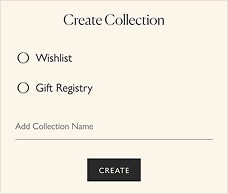
Save to multiple collections
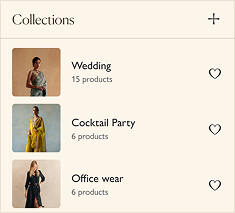
Clicking on the heart icon on product cards or pages will show you a list of all the collections you ' ve created. Tap the heart icon in the list to save that product to multiple collections. Or tap it again to remove it from the collection.
You can also create a new collection here by tapping on the plus icon in the top right corner.
Organise a collection
Inside the collection you will see its name and an Organise Icon next to it which will open up 3 options for you.

Add A Section

Move

Delete
